

Navigate
Products
Download
eShop
Upgrade
Overview
Training
Support


Navigate
Products
Download
eShop
Upgrade
About
Training
Support


These parameters apply exclusively to selected Connection objects. For a comprehensive overview, please refer to the detailed Connections chapter.
The Maximum and Minimum Length settings function identically to those found in the Manual Stitches object.
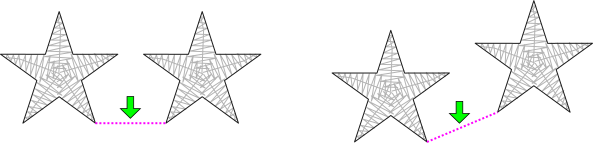
Connections are automatically adjusted when objects are moved or otherwise transformed to prevent the unintended insertion of a jump (trim).
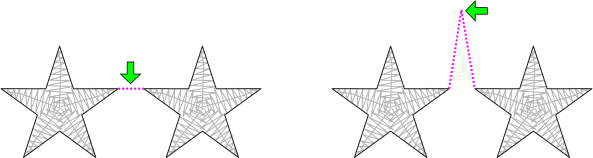
The Jumps option enables the creation of controlled jump stitches between objects. If embroidery objects are positioned in close proximity, removing the small jump stitches between them can be difficult (as shown in the left illustration). By applying a connection with the jumps option, the user can create longer, controlled jumps that are more accessible for trimming.
The parameters on this tab facilitate an object-level control, overriding global tie-up settings. This capability allows for the individual adjustment of securing tie-up stitches for the specific object.
This tab expands functionality beyond simple global defaults by providing: