

Navigate
Products
Download
eShop
Upgrade
Overview
Training
Support


Navigate
Products
Download
eShop
Upgrade
About
Training
Support


Tie-up stitches are designed to prevent thread from pulling through the fabric once it has been trimmed.
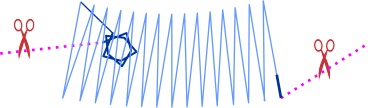
In machine embroidery, tie-in and tie-off stitches are essential for securing the thread at the beginning and end of a design element. These securing stitches are generated only for objects preceded or followed by a jump stitch - a non-stitching movement where the thread is intended to be cut. While tie-up stitches can form a simple linear path, they can also involve elaborate patterns, such as a star shape, to provide a more robust anchor. Ideally, the tie-in stitch is concealed by subsequent layers of embroidery.
A tie-in stitch is a reinforcing stitch placed at the start of an object to prevent unraveling.

Icon representing the tie-in placement point.
Conversely, a tie-off stitch is performed at the end of an object to anchor the thread and prevent the final stitch from loosening. Unlike a tie-in, a tie-off is usually a small, plain stitch; its purpose is to discreetly secure the thread without adding unnecessary bulk or visible patterns. Because the tie-off typically sits atop the final cover layer, its visibility should be kept to a minimum. A pattern can also be used for the tie-off stitch, provided it is placed where subsequent stitching will hide it.

Icon representing tie-off stitches.
These two types of securing stitches are collectively referred to as tie-up stitches. This general term encompasses both start-point (tie-in) and end-point (tie-off) securing mechanisms. Their primary function is to ensure the durability and longevity of the embroidered design by preventing the thread from pulling out during wear or laundering.

Common icon for tie-up stitches. This marks sections where both tie-in and tie-off settings are managed.
In Studio NEXT, the control of tie-up stitches is managed hierarchically to provide both consistency and flexibility. Control is governed at two distinct levels:
Global tie-up settings serve as the default parameters for the entire design. They ensure consistent thread security and minimize the need for manual adjustments. These settings control both tie-in and tie-off stitches for every object (such as fills, outlines, and columns) unless they are specifically overridden at the object level.
The global settings are identical for both tie-in and tie-off stitches, utilizing simple linear stitch structures that are placed automatically.
While global settings offer a reliable baseline, users have the flexibility to override them for specific objects within the individual Parameters window. Adjusting the tie-in and tie-off settings for a particular object allows for the fine-tuning of both the embroidery process and the final aesthetic.
The default tie-up is an automatically generated linear structure. It is created by dividing and layering the initial (for tie-in) or ending (for tie-off) stitch of an object in a single location. Because it is placed precisely at the existing stitch, no manual position marking is required for this basic type.

Icon representing the simple linear tie-in structure.
Small forward and backward stitches are placed directly on top of one another or slightly offset to create a reinforced knot. This multi-pass approach locks the thread without creating significant bulk, allowing it to be easily covered by the regular stitches of the object. However, this basic knot may be insufficient for certain high-stress applications.
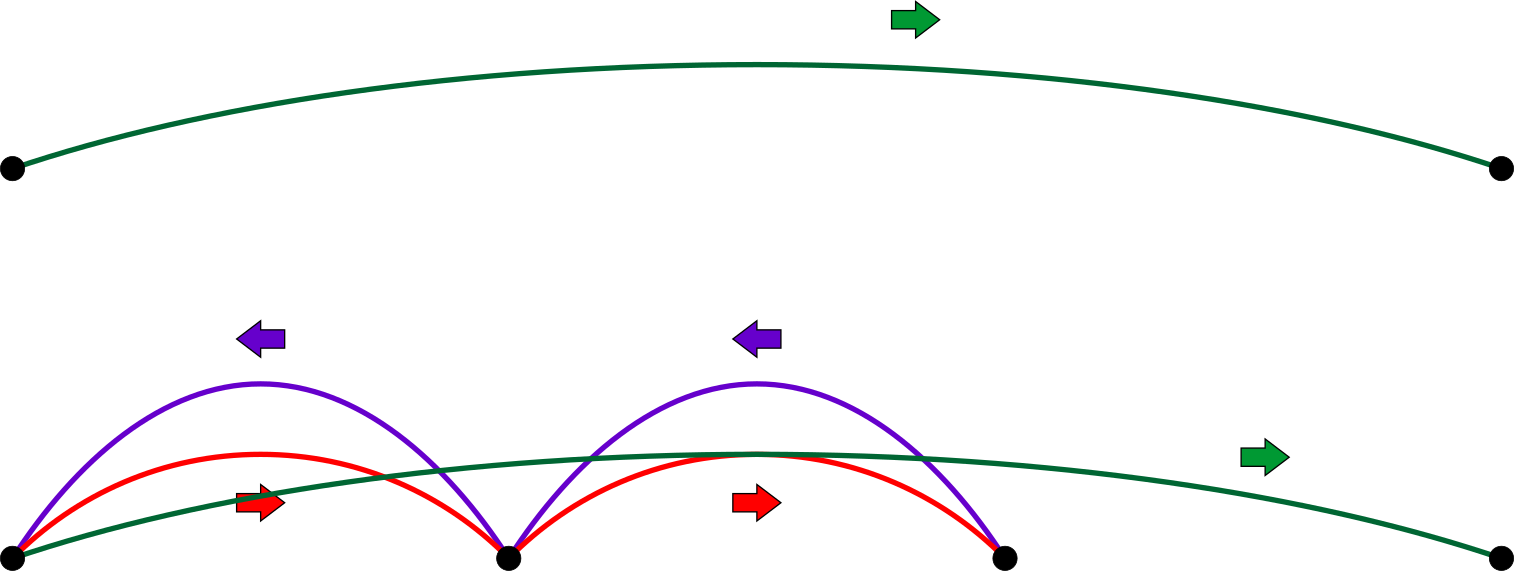
Conceptual diagram of a basic tie-up created by dividing the first or last stitch of an object.
For design elements requiring a more robust anchor, advanced tie-up stitch patterns are available.

Examples of advanced tie-up stitch patterns.
Unlike a one-dimensional linear stitch, a tie-up pattern is a two-dimensional, self-crossing structure. These overlapping multi-directional stitches effectively lock the thread to the fabric, significantly reducing the risk of unraveling.
Because a pattern occupies a larger area and its placement can influence the starting or ending point of an object, its position must be defined manually. This is achieved by placing a marker in node-editing mode at the desired location before defining the pattern properties (type and size) in the Parameters window. This process ensures the secure pattern is placed exactly where intended.

Example of tie-in pattern application. Left: Column object with a manually placed marker. Right: Resulting stitches with the tie-in highlighted for visibility.
During execution, the software stitches the pre-programmed pattern at the marked location, automatically rotating it toward the direction of the connection stitch.
The tie-up pattern marker does not strictly need to be placed inside the object it anchors. The marker can be moved freely using node-editing mode to optimize for both security and appearance.
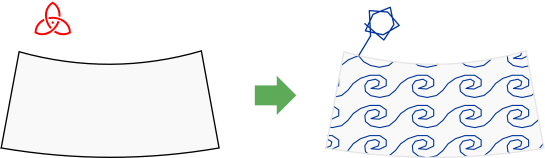
Example of a tie-in stitch pattern placed outside of the primary object.
External placement is essential when working with objects that have loose fills. If a dense, self-crossing tie-up pattern were placed inside a sparse mesh or motif fill, it would remain highly visible and create an unsightly knot. To maintain a clean design, it is preferable to place the tie-up where it will be hidden by another object, such as a border or an overlapping satin stitch. This strategic placement ensures the thread is anchored securely without compromising the visual quality of the fill.