

Navigate
Products
Download
eShop
Upgrade
Overview
Training
Support


Navigate
Products
Download
eShop
Upgrade
About
Training
Support


These parameters apply exclusively to selected Manual Stitches objects.
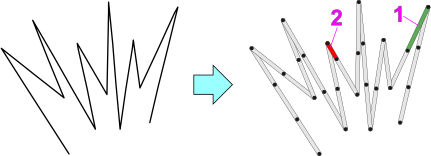
The Maximum Length (1) setting determines the longest stitch permitted when the Manual Stitches object is compiled into actual stitches. Any manual stitch exceeding the sum of the Maximum Length and the Minimum Length is automatically divided into one or more stitches of the maximum length, followed by a shorter stitch if necessary. This remaining stitch will never be shorter than the specified Minimum Length (2).
The Manual Stitches are a specific object type where the digitizer maintains absolute control over every needle penetration. Unlike automatic objects - such as Fill or Satin stitches - where the software calculates stitch placement based on density, a Manual Stitch object follows the exact nodes placed by the user.
Manual stitches are primarily utilized for:
Even though points are placed manually, the embroidery software must adhere to the physical limitations of the embroidery machine. Most machines cannot execute a single stitch longer than approximately 12.1 mm to 12.7 mm. The parameters function as follows:
The parameters on this tab facilitate an object-level control, overriding global tie-up settings. This capability allows for the individual adjustment of securing tie-up stitches for the specific object.
This tab expands functionality beyond simple global defaults by providing: