

Navigate
Products
Download
eShop
Upgrade
Overview
Training
Support


Navigate
Products
Download
eShop
Upgrade
About
Training
Support


An embroidery design should contain as few thread trims as possible. Trims are time-consuming and can decrease the quality of the embroidery due to potential thread loosening. Therefore, use connections between objects whenever possible to reduce the total trim count. A connection is a series of running stitches intended solely to move the thread from one location to another, bypassing the need for a trim. Studio provides a specialized tool for creating these connections, located in the Tool Bar on the left side of the Studio window.
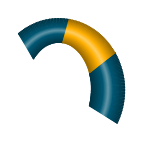
Connections should be utilized between objects of the same color in areas where they are either hidden or do not significantly impact the visual appearance of the design. They are frequently positioned beneath other objects or along outlines. In the case of small lettering or adjacent small objects where connections cannot be hidden, they should be made as short as possible. This type of connection is referred to as a "nearest point" connection.
The sewing order of objects should always be selected to require the minimum number of trims. For example, if a design contains two blue objects and one yellow object, the blue objects should be sewn first, followed by the yellow object on top. To avoid trimming between the blue objects, they can be linked with a connection hidden beneath the subsequent yellow object layer.
Define the start and end points of each blue object so that the inserted connection does not interrupt the sewing continuity. The first blue object should end exactly where the connection begins, and the second blue object should begin where the connection ends.
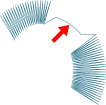
There are two methods for creating a connection:
Note: To quickly adjust a straight-line connection by adding multiple nodes, use the Insert Elements Mode.
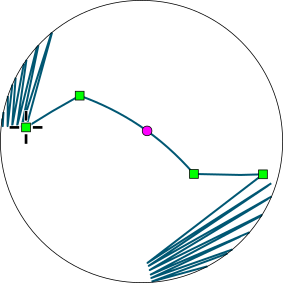
In this example, the connection consists of three elements: a straight line, a curve, and another straight line. The starting point of the connection is indicated by a cross.
The shape of the connection is designed so that the stitches run deep within the area of the yellow object that will be sewn over it. This prevents the connection from becoming visible if a slight displacement occurs during the sew-out. Such displacement often results from loose fabric hooping or the "pull effect" of the thread. If the overlapping object is large enough, place the connection at least 2-3 mm inside its boundary. For smaller objects, position the connection through the center.
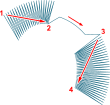
The connection ensures a continuous thread path from the beginning of the first object (1) to the end of the second object (4).
Connections feature adjustable Minimum and Maximum stitch lengths. Maximum-length stitches are applied to straight-line segments, while curved segments utilize shorter stitches to maintain smooth curves. The Minimum Stitch setting defines the shortest allowed stitch within the connection.
In areas where running stitches between objects are not desired, the connection object allows for the creation of a "controlled jump stitch" to facilitate easier manual trimming.
Smart connections are generated using an advanced versions of the Create Connection to Previous Object command. These features, titled Smart Connection to Previous Object (Center Line) and Smart Connection to Previous Object (Contour), are accessible via Main Menu > Build and in some Studio's tools, such as the Freehand tool.
Similar to the standard command, the Smart Connection links disjoint objects; however, it generates a complex, optimized connection path.
The Center Line path initiates at the closest points between the objects and then continues as a hidden path beneath the target object. The path automatically adapts to the shape of the object, navigating around openings (holes). This command facilitates more efficient digitizing by significantly reducing the manual effort required to construct connection paths.
The Contour path initiates at the closest points between objects and continues along the outer edge of the target object. This method is intended for objects with loose fills, such as mesh, motifs, or gradient plain fills. Additionally, a connection path following the target object's contour can be concealed by a satin-stitch zigzag border.
The following pictures outline various ways to connect two disjointed objects. In these examples, connection segments covered by the selected object are represented by dashed lines, while visible segments are shown as solid red lines.
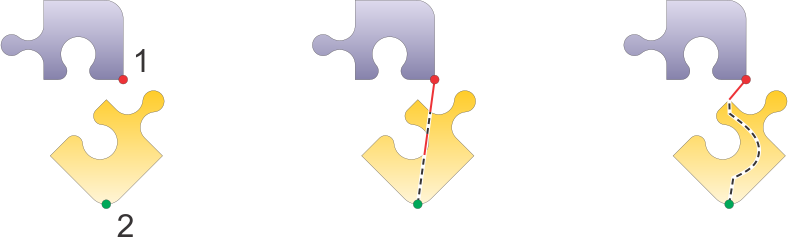
Note: The term "Smart" refers to the moment the connection path is created, using the target object's shape to find the optimum path. Once created, it behaves like a normal connection object and does not automatically adapt if the target object's shape is changed later. If the shape changes, the connection must be deleted and recreated to reflect the new geometry.