Navigate
Products
Download
eShop
Upgrade
Overview
Training
Support


Navigate
Products
Download
eShop
Upgrade
About
Training
Support



Digitizing in Embird Studio fundamentally involves drawing vector objects that are automatically filled with stitches according to parameters set individually for each one. This approach is highly efficient because an embroidery design typically contains distinct areas requiring specific stitch types - such as smooth fills (Tatami), satin stitches (Columns), or outlines.
These areas are digitized as separate objects characterized by their type and color. The software then automatically generates the necessary individual stitches, relieving the user from the task of defining every single needle penetration manually.
Each object type is digitized using a dedicated tool. For example, a satin stitch column utilizes one tool, while a complex filled area utilizes another. This object-based workflow streamlines the entire design process.
The order of stitches within an object is primarily controlled by the program's algorithms, which calculate the most efficient path. However, the user retains control over one critical aspect: the start and end points of the object.
Created objects are organized and listed in the Object Inspector panel. This list displays the objects in their actual stitching order from top to bottom, allowing the user to manage the sequence in which the machine will sew the design.
Objects utilize vector contours, meaning they can be resized without loss of quality.
An object in Studio is usually drawn using several contour elements. Straight and curved elements can be combined freely. These elements are defined by points called nodes.
Studio supports three types of contour elements:
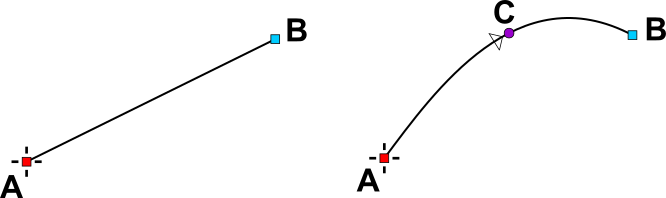
A line segment (left) is defined by 2 points. A simple curve (center) is defined by 3 points. A Bézier curve (right) is defined by 4 points.
Markers are specialized, movable points or handles associated with specific object types. They are not part of the object's contour; instead, they allow the user to define the location of specialized operations or effects: