

Navigate
Products
Download
eShop
Upgrade
Overview
Training
Support


Navigate
Products
Download
eShop
Upgrade
About
Training
Support


Shaping involves modifying the boundaries of two or more vector objects by either combining their areas or removing overlapping portions to form new shapes. The three primary shaping operations available are Union, Difference, and Intersection.
These commands are applied to objects selected using the Pointer Tool (arrow) or those highlighted within the Object Inspector.
To learn how to utilize shaping commands as a mask for splitting vector data, please refer to the Use of the Mask to Split Vector Objects chapter.
The Main Menu > Build > Shaping commands allow you to modify and combine selected objects using Boolean operations. These functions are exclusively compatible with solid vector objects, such as Fill, Mesh, Sfumato, and Column types.
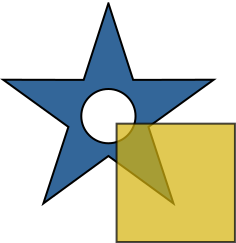
To execute these commands, you must first select multiple overlapping or adjacent objects.
Illustration: Two selected objects: a star and a rectangle. The star includes a digitized opening.
Note: These commands cannot be applied to Outlines, Manual Stitches, or Connection objects.

The Union command generates a new object (or a set of objects) by merging all selected items into a single boundary. Nodes and edge segments located within the resulting filled area are automatically removed. If the selected objects do not overlap or touch, the union operation will simply produce copies of the original objects.
Illustration: The result of the Union command applied to two objects.
Note: This command is particularly useful for creating a global underlay (fill without cover stitches) beneath a complex design. To do this, select all relevant objects and apply the Union command. Then, navigate to the Parameters window, configure your preferred underlay settings, and uncheck the "Make Cover Stitches" box to leave only the stabilization stitches.
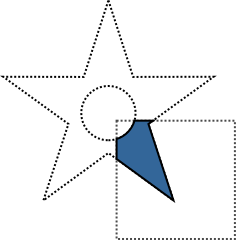
The Intersection command creates a new object (or objects) representing only the area where all selected objects overlap. If there is no overlapping area between the selected objects, the function will not produce a result.
Illustration: The result of the Intersection command applied to two objects.
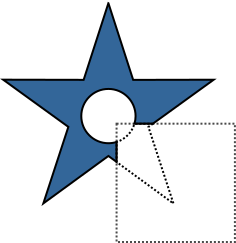
The Difference command subtracts subsequent selected objects from the object that appears first in the Object Inspector list. It is essential to organize the stacking order in the Object Inspector before executing this command to ensure the correct object acts as the "base." The resulting object(s) will consist only of the areas from the first object that were not covered by the objects positioned after it in the selection.
Illustration: The result of the Difference command applied to two objects.