

Navigate
Products
Download
eShop
Upgrade
Overview
Training
Support


Navigate
Products
Download
eShop
Upgrade
About
Training
Support


Detailed information regarding the Insert Elements Mode is available in its respective chapter.
In computerized machine embroidery, a column object consists of two distinct edges that define its boundary. The software generates stitches by alternating the needle direction from one side to the other, following the overall path established by these edges. This method ensures that the embroidery fills the area between the boundaries while maintaining the desired stitch density and orientation relative to the shape of the object.
End of Segment command inserts a partition line into a column or appliqué object, dividing it into distinct segments. One endpoint of the new segment-end line is anchored to the selected node, while the opposite endpoint is automatically positioned on the corresponding nearest node of the other side.
Segment ends are essential for defining the stitch direction within a column or appliqué. During stitch generation, the software analyzes the orientation of these segment-end lines and adjusts the stitch flow at those specific locations to match.
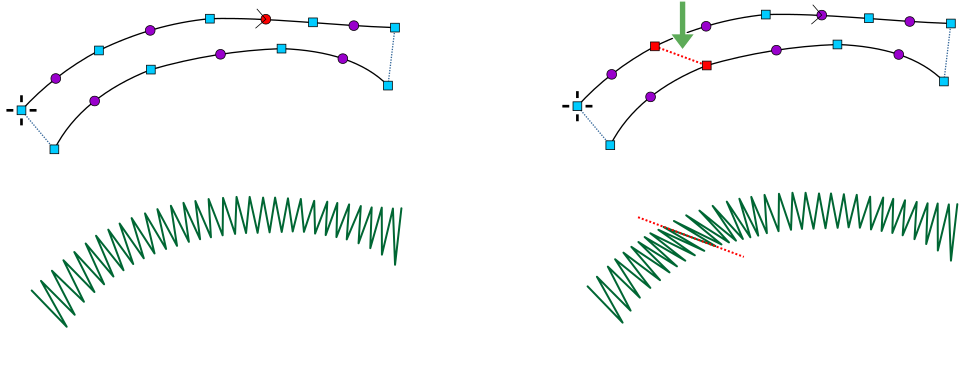
End of segment — influence on stitch direction flow.