

Navigate
Products
Download
eShop
Upgrade
Overview
Training
Support


Navigate
Products
Download
eShop
Upgrade
About
Training
Support


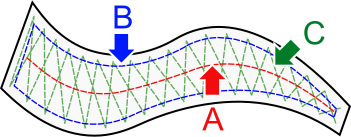
The underlay is an auxiliary structure composed of running stitches sewn onto the fabric before the visible top (cover) stitches are applied. It serves as the design's backbone, providing essential stability and reinforcement.
This guide explains how Embird Studio NEXT users can customize underlay settings for individual embroidery objects to override global defaults. It details the parameters available within the Advanced Underlay tab of the Parameters window. This tutorial focuses specifically on configurations for Center, Edge, and Zig-Zag underlay types, enabling the fine-tuning of stitch properties.
Underlay stitches for solid objects - such as plain fills, autocolumns, columns, and borders - are controlled by specific parameters. While some parameters are local (individual to each vector object), others are defined globally. Global parameters can be overridden using the controls described below.
Both global and local parameters are accessible through the Parameters window. The controls for overriding global underlay settings are located in the Advanced Underlay tab, organized into groups based on the underlay type.
Inherit from Overall Settings: This toggle enables or disables the override of global settings with local configurations.
Min. Length: Defines the approximate length of the shortest stitches in the center underlay. Shorter stitches typically occur in sharply curved sections of the underlay path.
Max. Length: Defines the approximate length of the longest stitches in the center underlay. Longer stitches occur in straight sections of the underlay path.
Center walk underlay is not available for Plain Fill mode.
Inherit from Overall Settings: This toggle enables or disables the override of global settings with local configurations.
Min. Length: Defines the approximate length of the shortest stitches in the edge underlay. Short stitches occur in sharply curved sections of the underlay path.
Max. Length: Defines the approximate length of the longest stitches in the edge underlay. Long stitches occur in straight sections of the underlay path.
Offset Mode: Determines the behavior of the Offset parameter. The value can be set as either a percentage (relative to the automatic optimized value) or as an absolute measurement.
Offset: Defines the internal gap between the object's contour and the edge walk underlay.
Edge walk underlay is not available for Multi Layer Column mode.
Inherit from Overall Settings: This toggle enables or disables the override of global settings with local configurations.
Min. Length: Defines the approximate length of the shortest stitches in the zig-zag underlay. Short stitches occur in sharply curved sections of the underlay path.
Max. Length: Defines the approximate length of the longest stitches in the zig-zag underlay. Long stitches occur in straight sections of the underlay path.
Offset Mode: Determines whether the Offset value is treated as a percentage or an absolute value.
Offset: Defines the internal gap between the object's contour and the zig-zag underlay.