

Navigate
Products
Download
eShop
Upgrade
Overview
Training
Support


Navigate
Products
Download
eShop
Upgrade
About
Training
Support


Have you ever wondered if it is possible to convert photo or picture to embroidery pattern? Our leading photo-to-embroidery conversion module, Sfumato, allows easy and fast embroidery digitizing of multicolored portraits, landscapes, still lives and other designs from photos. We named this module after a Renaissance painting technique due to the subtle transitions between colors and tones. Sfumato module is integrated into Studio, no separate download is needed. Sfumato objects can be combined with other objects like lettering, satin outlines, etc., but their digitizing requires registration of respective plug-ins like Font Engine or Digitizing Tools.
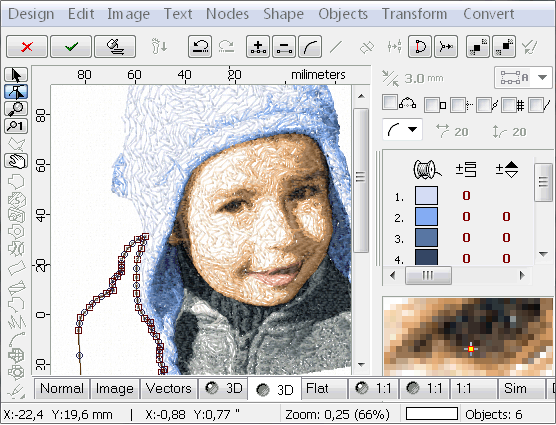
User imports photo into the background of the working area and then draws Sfumato objects on top of the photo. Just like other objects in the Studio, Sfumato objects have vector boundaries that are automatically filled with stitches. Photo-realistic effect is achieved with variable density of the thread flow.


Objects are filled with stitches so that thread forms looser or heavier meanders to create shading effects while fabric shows through the stitches. In general, the loose meanders are used on low density areas.

The face on the boy's portrait is a single Sfumato object with 5 shades of skin color and a hole.
Special controls and paramaters are available to tune density and colors of Sfumato object. Additional features like openings, carvings and color mask can be applied to achieve required stitch layout and texture.
Each Sfumato object can have 1-5 shades of its 'basic color' or user-defined shades. Chosing proper number of separate objects and proper number of shades within each object allows to achieve various coloring effects.

Single Sfumato object with just 1 shade

Single Sfumato object with 5 shades of sepia color

Single Sfumato object with 5 user-defined shades


Multicolored Sfumato design
The boy's portrait on above example contains multiple Sfumato objects: the cap, face, mouth, shoulder and breast. Each of these objects has its own color scale.
